
Cancellation of iLS Membership
- Login with your iLS’ user credentials and visit My Account on Top Level Menu
- On left side menu visit “Subscriptions“
- From there click “View” on your Subscription
(here you can also see your history and download corresponding invoices) - Click “Cancel” in order to cancel iLS Membership and any corresponding payments.
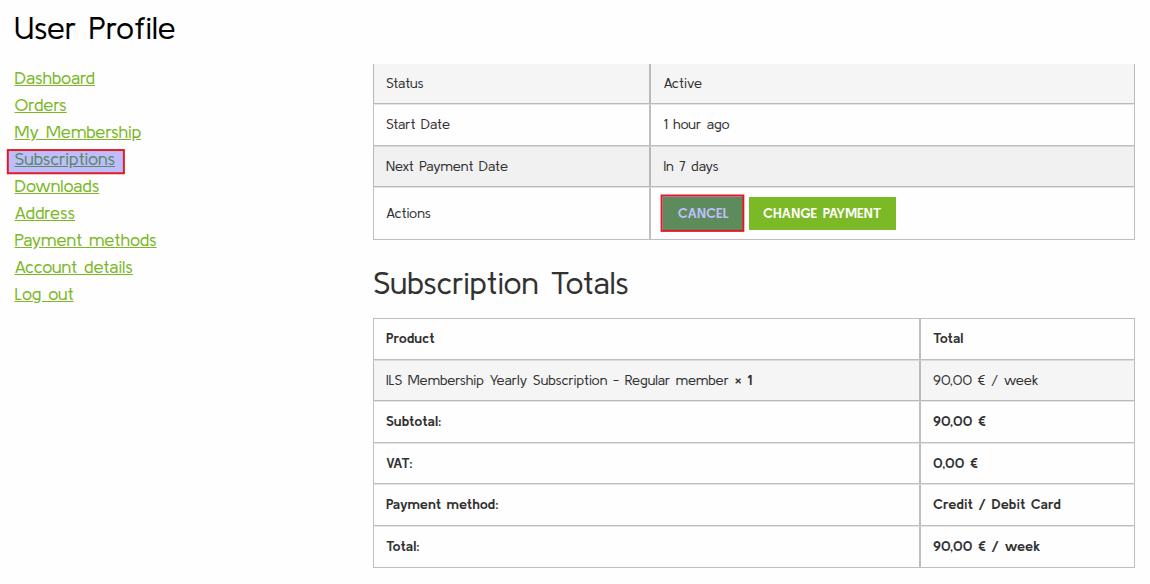
- Done! Your Status will change from “Active” to “Pending Cancellation” indicating future memberships are deactivated.
As long as it is in pending state, you’ll have full access to iLS Members content due to your current membership. Your current membership stays active until its subscription end date.
Resubscribing an iLS Membership
At any time, you can easily resubscribe/revert your cancellation just by Clicking “Resubscribe“. By doing so, you’ll get redirect to the the corresponding product page in order to checkout regularly again.
Payment will start when current Membership ends. So its payment can be month in the future. Depending on how long your current subscription lasts.